Application Architecture
An iOS project is composed of many files that define different aspects
of the application. This guide presents high level overview of the most
common components of an application and how they fit together. A more
comprehensive guide by Apple can be found here.
Structure of a UIApplication
All iOS applications are instances of UIApplication.
Each application has a number of events in its lifecycle (e.g. launched,
went into the background, terminated). As with other classes in the
UIKit framework, you control how the application will respond to these
events by providing it with a delegate. A
UIApplication’s delegate must implement the
UIApplicationDelegate protocol.
When you create a new application in Xcode, the IDE automatically sets
up the code to instantiate a UIApplication when the project is run.
It also generates a class that implements UIApplicationDelegate called
AppDelegate and sets the application’s delegate
property to an instance of this class.
NB: In Swift projects this is done via the @main attribute on the
AppDelegate class (or @UIApplicationMain in older code — Swift
deprecates @UIApplicationMain in favor of @main per
SE-0383). In Objective-C projects the set up is explicitly
done in the main.m file.
The entry point to your application
Of the methods that you can implement in your UIApplicationDelegate,
perhaps the most important is
didFinishLaunchingWithOptions. This method will
be called once iOS has done most of the system initialization for your
app. It is commonly used as an entry point where you can implement
custom logic that initializes your application, such as configuring
third-party SDKs or setting up data stores. Under the scene-based
life cycle (required when building with the iOS 27 SDK or later — see
the note below), setting up the first view controller happens in the
scene delegate rather than here: the app delegate handles
process-level events, while each scene delegate manages the life cycle
of one instance of your app’s UI. For example, in applications that
require log ins, the scene delegate’s connection method is a good place
to check whether there is a current user and show a different initial
view controller depending on the “logged in” state.
The root view controller
In a scene-based app, each scene delegate owns the window
object for its scene. Of particular importance is the ability to set
the window’s root view controller. This is the first view controller
that will load and present its view to the user. More on root view
controllers can be found below.
The root view controller in storyboard applications
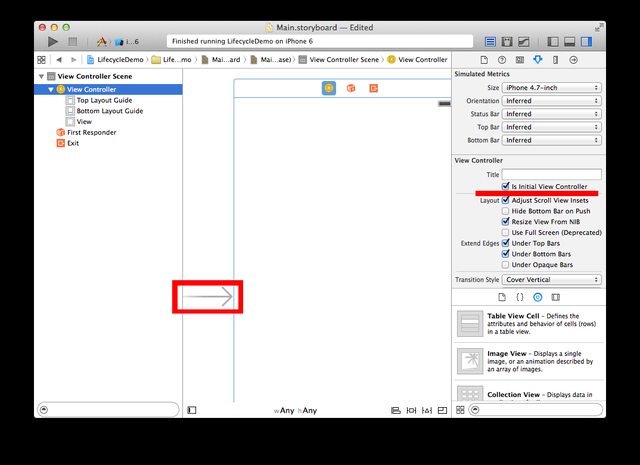
In simple storyboard applications, you can avoid working with the
UIApplicationDelegate and simply set the root view controller directly
in your Main.storyboard. By default Xcode will generate an initial
view controller for you and set it to be the root view controller. This
is indicated by the arrow that points to the view controller. Once you
start adding more view controllers to your application, you can change
the root view controller by dragging this arrow around. You can
also select a view controller and set it to be the root view controller
by using the Is Initial View Controller checkbox in the Attributes
Inspector.
Programmatically setting the root view controller
In applications not using storyboards, you must programmatically set the
root view controller. Under the scene-based life cycle this is done in
your scene delegate’s
scene(_:willConnectTo:options:) method: create a window
attached to the scene with UIWindow(windowScene:),
set its rootViewController, and make it key and visible.
import UIKit

class SceneDelegate: UIResponder, UIWindowSceneDelegate {

    var window: UIWindow?

    func scene(_ scene: UIScene, willConnectTo session: UISceneSession, options connectionOptions: UIScene.ConnectionOptions) {
        // Confirm the scene is a window scene in iOS or iPadOS.
        guard let windowScene = scene as? UIWindowScene else { return }

        let vc = UIViewController()

        let label = UILabel()
        label.text = "hello, world!"
        label.frame = vc.view.frame

        // by default a UIViewController's .view property is set to an instance of UIView
        // of course you can set this to any custom subclass of UIView
        // one way to do this is subclass UIViewController and override the loadView method
        vc.view.backgroundColor = UIColor.cyan
        vc.view.addSubview(label)

        window = UIWindow(windowScene: windowScene)

        // This can be set to any subclass of UIViewController.  You can also use conditional
        // logic here to set up different view controllers depending on application state
        window?.rootViewController = vc
        window?.makeKeyAndVisible()
    }
    ...
}
The system knows to create your SceneDelegate because its class name
is listed (as UISceneDelegateClassName) under the
UIApplicationSceneManifest key in the Info.plist — Xcode’s app
template sets this up for you. If you remove the storyboard from the
template project, also delete the Storyboard Name
(UISceneStoryboardFile) entry from the scene manifest so the system
doesn’t try to load the storyboard’s initial view controller.
Note: Before the scene-based life cycle, apps created the window
in the app delegate’sdidFinishLaunchingWithOptionsmethod with
UIWindow(frame: UIScreen.main.bounds), and you may still see that
pattern in older tutorials. It no longer works: as of the iOS 27 SDK
the scene-based life cycle is required — per the
iOS & iPadOS 27 release notes,
apps built with the latest SDK must adopt it or they fail to launch —
andUIScreen.mainis itself deprecated as of iOS 26. Apple’s
TN3187: Migrating to the UIKit scene-based life cycle
covers migrating code like this.

Other hooks in the application lifecycle
The UIApplicationDelegate protocol provides many other hooks into the
application’s lifecycle giving you opportunities to things like respond
differently depending on how your application was launched, set up and
tear down temporary state depending whether your app is in the
foreground, and persist data before exiting. A detailed discussion of
the application lifecycle can be found here.
Model-View-Controller in iOS
Most applications you write for iOS will use a model-view-controller
(MVC) architecture similar to the one described by Apple
here. This is a proven design that helps to break up your
application into manageable parts with clean separation of concerns.
What follows is a description of how each part of MVC typically
applies in iOS programming.
NB: This description of MVC is actually slightly different than the one
originally described by Krasner and Pope in the 1980s,
and is probably closer to what some people would call a
model-view-presenter pattern. An interesting discussion of the
evolution of MVC architecture over time by Martin Fowler can be found
here.
Models
Model objects encapsulate a logical unit of domain specific data in your
application. In a photo-sharing social network, they might include
entities like “Users” and “Photos”. Models may have relationships with
other models. For example, a “Photo” might have been “posted by” a
“User”. The model layer will generally contain any domain specific
logic for manipulating your data and relationships. For example if a
User has a field keeping track of the number of Photos she has posted,
this field will have to updated once she posts a new Photo.
Often in an iOS application, much of the core logic around manipulating
models and their relationships is offloaded to a remote API (e.g. a REST
API). In these cases, the models in your iOS project will generally be
some Swift (or Objective-C) representation of the resources defined by
the API.
The model layer is responsible for knowing how to perform CRUD
operations on models. This can include having Swift (or Objective-C)
bindings to right API endpoints and implementing logic to
serialize/deserialize models from/into the different data formats.
In modern Swift this serialization/deserialization logic is handled by
the built-in Codable
protocol with JSONDecoder/JSONEncoder when working with REST APIs.
(Older Objective-C codebases used libraries like
Mantle or the long-retired
RestKit for the same purpose.)
In the model-view-controller pattern the model is responsible for
notifying related controllers that there has been a change in its state.
This happens for example when the model layer has finished loading
data from a remote service and informs the view controller so that it
can transition out of the loading state and notify the views to display
the data.
Views
Views are responsible for displaying data (literally drawing
themselves on the screen) and responding to user actions. Every
view in an iOS application will be a subclass of
UIView
UIKit comes with a selection of predefined views that are
fairly comprehensive and, used creatively, can implement many UI
designs.
You can also create custom views by subclassing any UIView class.
Custom views are generally composed of one or more built-in views. If
this is the case, the layout for a custom view can be defined using
Interface Builder in a storyboard or nib, or done programmatically in
the view’s class.
You’ll find yourself working with two kinds of views: reusable
components that are fairly generic (e.g. UITableView) and specific
views that meant for presenting a specific model (e.g. a custom cell
class in a UITableView).
In the former case you’ll want to design a good interface so that your
view can be reused in many situations. In the later case, it is OK for
your view to be tightly coupled to your model since its only purpose is
to present a visual representation of the model.
A view may be responsible for managing the instantiation and layout of
its subviews. However as you traverse up the view
hierarchy ultimately you’ll find some parent view that
was instantiated by and inserted into the view hierarchy by a view
controller. View controllers are responsible for creating views and
notifying views when they need to refresh themselves with the latest
data from the model.
Conversely, views are responsible for responding to user actions and
propagating events to view controllers so that they can handle them
appropriately, for example by updating the model.
Often views will translate a low level event into a semantic event. For
example a table cell view responsible for displaying a Tweet might
translate the low level of the event button tap on the “star button”
into the semantic event of “user favorited Tweet”. The view would then
pass this high level message to the view controller who might then have
the model layer make an API call to complete the “favoriting”.
The delegate pattern is useful for this kind of event propagation and
is used widely throughout iOS frameworks.
View Controllers
The controller sits between your model and view. It coordinates the
interaction between the model and the view by passing on state changes
from model to the view and propagating events from the view to the
model. This relationship can be summarized as follows:
                                             update view
     -- state change -->                 -- with new state -->
Model                     View Controller                     View
     <-- handle event --                 <-- interpret and ---
      by updating model                     propagate event
Your view controllers will always subclass from UIViewController.
Each view controller usually manages one “screen” within your app. For
instance, an email client might have an AccountsListViewController. If
you clicked on an account, it would push in to an InboxViewController,
which displays a list of emails. If you tapped an email, it would
display the full email within an EmailDetailsViewController.
There is a notion of container view controllers that
manage the multiple view controllers and their interactions. The most
common built-in container view controller is the navigation controller.