Using OkHttp
Overview
OkHttp is a third-party library developed by Square for sending and receive HTTP-based network requests. It is built on top of the Okio library, which tries to be more efficient about reading and writing data than
the standard Java I/O libraries by creating a shared memory pool. It is also the underlying library for Retrofit library that provides type safety for consuming REST-based APIs.
The OkHttp library actually provides an implementation of the HttpUrlConnection
interface, which Android 4.4 and later versions now use. Therefore, when using the manual approach described in this section of the guide, the underlying HttpUrlConnection class may be leveraging code from the OkHttp library. However, there is a separate API provided by OkHttp that makes it easier to send and receive network requests, which is described in this guide.
In addition, OkHttp v2.4 also provides a more updated way of managing URLs internally. Instead of the java.net.URL, java.net.URI, or android.net.Uri classes, it provides a new HttpUrl class that makes it easier to get an HTTP port, parse URLs, and canonicalizing URL strings.
Setup
Make sure to enable the use of the Internet permission in your AndroidManifest.xml file:
<uses-permission android:name="android.permission.INTERNET"/>
Simply add this line to your app/build.gradle file:
dependencies {
  implementation 'com.squareup.okhttp3:okhttp:5.3.2'
}
Note: If you are upgrading from an older version of OkHttp, your imports will also need to be changed from import com.squareup.okhttp.XXXX to import okhttp3.XXXX.
Note: If you are still using Picasso and want it to share an OkHttpClient, no extra artifact is needed on modern versions. Picasso has shipped a built-in com.squareup.picasso.OkHttp3Downloader since version 2.71828 (released 2018-03-07); the latest published release is 2.8 (2020-08-10). Wrap the client when building the singleton Picasso instance:
// Singleton OkHttpClient and Picasso instance
OkHttpClient client = new OkHttpClient();
Picasso picasso = new Picasso.Builder(context)
    .downloader(new com.squareup.picasso.OkHttp3Downloader(client))
    .build();
The older standalone com.jakewharton.picasso:picasso2-okhttp3-downloader:1.1.0 artifact is only required for Picasso 2.5.2 and earlier — its README states “Use only with Picasso 2.5.2 or lower. In Picasso 2.71828 and higher, there’s now built-in equivalent com.squareup.picasso.OkHttp3Downloader,” and the repository has since been archived. Do not add it alongside Picasso 2.71828+.
As of OkHttp 3, it is recommended you declare the OkHttpClient as a singleton because OkHttp 3 no longer relies on a global connection pool; see the 3.0 changelog for details.
Note: Square’s Picasso README marks the library as deprecated and recommends Coil for new projects. If you are starting a new image-loading integration, prefer Coil (which speaks OkHttp natively via coil-network-okhttp) over wiring Picasso to OkHttp3 yourself.
Sending and Receiving Network Requests
First, we must instantiate an OkHttpClient and create a Request object.
// should be a singleton
OkHttpClient client = new OkHttpClient();

Request request = new Request.Builder()
                     .url("https://publicobject.com/helloworld.txt")
                     .build();
If there are any query parameters that need to be added, the HttpUrl class provided by OkHttp can be leveraged to construct the URL:
HttpUrl.Builder urlBuilder = HttpUrl.parse("https://ajax.googleapis.com/ajax/services/search/images").newBuilder();
urlBuilder.addQueryParameter("v", "1.0");
urlBuilder.addQueryParameter("q", "android");
urlBuilder.addQueryParameter("rsz", "8");
String url = urlBuilder.build().toString();

Request request = new Request.Builder()
                     .url(url)
                     .build();
If there are any authenticated query parameters, headers can be added to the request too:
Request request = new Request.Builder()
    .header("Authorization", "token abcd")
    .url("https://api.github.com/users/codepath")
    .build();
Synchronous Network Calls
We can create a Call object and dispatch the network request synchronously:
Response response = client.newCall(request).execute();
Because Android disallows network calls on the main thread, you can only make synchronous calls if you do so on a separate thread or a background service. You can also use AsyncTask for lightweight network calls.
Asynchronous Network Calls
We can also make asynchronous network calls too by creating a Call object, using the enqueue() method, and
passing an anonymous Callback object that implements both onFailure() and onResponse().
// Get a handler that can be used to post to the main thread
client.newCall(request).enqueue(new Callback() {
    @Override
    public void onFailure(Call call, IOException e) {
        e.printStackTrace();
    }

    @Override
    public void onResponse(Call call, final Response response) throws IOException {
        if (!response.isSuccessful()) {
            throw new IOException("Unexpected code " + response);
        } else {
            // Request was successful - process the response body
            final String responseData = response.body().string();
        }
    }
});
Updating Views on UIThread
OkHttp normally creates a new worker thread to dispatch the network request and uses the same thread to handle the response. It is built primarily as a Java library so it does not handle the Android framework limitations that only permit views to be updated on the main UI thread.
For this reason, if you try to access or update views from outside the main thread in the Callback, you will probably receive an exception: android.view.ViewRootImpl$CalledFromWrongThreadException: Only the original thread that created a view hierarchy can touch its views. Read more about the relationship between the main thread and views here.
If you need to update any views from within a response, you will need to use runOnUiThread() or post the result back on the main thread:
client.newCall(request).enqueue(new Callback() {
    @Override
    public void onResponse(Call call, final Response response) throws IOException {
        // ... check for failure using `isSuccessful` before proceeding

        // Read data on the worker thread
        final String responseData = response.body().string();

        // Run view-related code back on the main thread
        MainActivity.this.runOnUiThread(new Runnable() {
            @Override
            public void run() {
                try {
                    TextView myTextView = (TextView) findViewById(R.id.myTextView);
                    myTextView.setText(responseData);
                } catch (IOException e) {
                    e.printStackTrace();
                }
            }
       }
    }
});
See this guide for more context. Alternatively, you could use an extension of Callback such as MainThreadCallback which wraps up this sort of behavior neatly and places you within the main thread from the response callback by default.
Processing Network Responses
Assuming the request is not canceled and there are no connectivity issues, the onResponse() method will be fired. It passes a Response object that can be used to check the status code, the response body, and any headers that were returned. Calling isSuccessful() for instance if the code returned a status code of 2XX (i.e. 200, 201, etc.)
if (!response.isSuccessful()) {
    throw new IOException("Unexpected code " + response);
}
The header responses are also provided as a list:
Headers responseHeaders = response.headers();
for (int i = 0; i < responseHeaders.size(); i++) {
  Log.d("DEBUG", responseHeaders.name(i) + ": " + responseHeaders.value(i));
}
The headers can also be access directly using response.header():
String header = response.header("Date");
We can also get the response data by calling response.body() and then calling string() to read the entire payload. Note that response.body() can only be run once and should be done on a background thread.
Log.d("DEBUG", response.body().string());
Processing JSON data
Suppose we make a call to the GitHub API, which returns JSON-based data:
Request request = new Request.Builder()
             .url("https://api.github.com/users/codepath")
             .build();
We can also decode the data by converting it to a JSONObject or JSONArray, depending on the response data:
client.newCall(request).enqueue(new Callback() {
    @Override
    public void onResponse(Call call, final Response response) throws IOException {
        try {
            String responseData = response.body().string();
            JSONObject json = new JSONObject(responseData);
            final String owner = json.getString("name");
        } catch (JSONException e) {

        }
    }
});
Processing JSON data with Gson
Note that the string() method on the response body will load the entire data into memory. To make more efficient use of memory, it is recommended that the response is processed as a stream by using charStream() instead. This approach, however, requires using the Gson library. See this guide for setup instructions.
To use the Gson library, we first must declare a class that maps directly to the JSON response:
static class GitUser {
    String name;
    String url;
    int id;
}
We can then use the Gson parser to convert the data directly to a Java model:
// Create new gson object
final Gson gson = new Gson();
// Get a handler that can be used to post to the main thread
client.newCall(request).enqueue(new Callback() {
    // Parse response using gson deserializer
    @Override
    public void onResponse(Call call, final Response response) throws IOException {
        // Process the data on the worker thread
        GitUser user = gson.fromJson(response.body().charStream(), GitUser.class);
        // Access deserialized user object here
    }
}
Sending Authenticated Requests
OkHttp ships two complementary mechanisms for authenticating outbound requests:
- An
Interceptoris the right hook when every request needs the same credential up front — for example, attaching a Bearer token or API key header. - An
Authenticatoris the right hook when the server gates the request behind anHTTP 401(or407for proxies) challenge and you need to supply or refresh credentials lazily. OkHttp automatically retries the original call once the authenticator returns a newRequest.
To attach a Bearer token (or any static Authorization header) to every request, install an interceptor on the builder:
OkHttpClient client = new OkHttpClient.Builder()
    .addInterceptor(chain -> {
        Request authenticated = chain.request().newBuilder()
            .header("Authorization", "Bearer " + accessToken)
            .build();
        return chain.proceed(authenticated);
    })
    .build();
If the server may reject the request with 401, prefer an Authenticator so OkHttp can re-issue the call once with the new credential. Return null from authenticate() to give up — for example, if a retry has already been attempted on the same response chain:
OkHttpClient client = new OkHttpClient.Builder()
    .authenticator((route, response) -> {
        if (response.request().header("Authorization") != null) {
            return null; // already retried; give up
        }
        String credential = Credentials.basic(username, password);
        return response.request().newBuilder()
            .header("Authorization", credential)
            .build();
    })
    .build();
For OAuth 2.0, combining the two — an interceptor that attaches the current access token and an authenticator that refreshes the token when the server returns 401 — is the canonical pattern. OAuth 1.0a request signing (the protocol the older okhttp-signpost artifact targeted) is rarely needed today; both okhttp-signpost and the upstream signpost library have not seen a code commit on master since September 2018 and August 2020 respectively, so for the unusual case where OAuth 1.0a is still required, sign each request inside a custom interceptor using a maintained signing implementation provided by the API you are calling.
Caching Network Responses
We can setup network caching by passing in a cache when building the OkHttpClient:
int cacheSize = 10 * 1024 * 1024; // 10 MiB
Cache cache = new Cache(new File(getApplication().getCacheDir(),"cacheFileName"), cacheSize);
OkHttpClient client = new OkHttpClient.Builder().cache(cache).build();
We can control whether to retrieve a cached response by setting the cacheControl property on the request. For instance, if we wish to only retrieve the request if data is cached, we could construct the Request object as follows:
Request request = new Request.Builder()
                .url("https://publicobject.com/helloworld.txt")
                .cacheControl(new CacheControl.Builder().onlyIfCached().build())
                .build();
We can also force a network response by using noCache() for the request:
.cacheControl(new CacheControl.Builder().noCache().build())
We can also specify a maximum staleness age for the cached response:
.cacheControl(new CacheControl.Builder().maxStale(365, TimeUnit.DAYS).build())
To retrieve the cached response, we can simply call cacheResponse() on the Response object:
Call call = client.newCall(request);
call.enqueue(new Callback() {
  @Override
  public void onFailure(Call call, IOException e) {

  }

  @Override
  public void onResponse(Call call, final Response response) throws IOException
  {
     final Response text = response.cacheResponse();
     // if no cached object, result will be null
     if (text != null) {
        Log.d("here", text.toString());
     }
  }
});
Troubleshooting
OkHttp can be hard to troubleshoot when trying to step through the various layers of abstraction in the libraries. You can add the HttpLoggingInterceptor that can be added when using the OkHttp3 library, which will print HTTP requests/responses through LogCat. You can also leverage Facebook’s Stetho project to use Chrome to inspect all network traffic.
HttpLoggingInterceptor
To use HttpLoggingInterceptor, add this dependency to your Gradle configuration:
dependencies {
  implementation 'com.squareup.okhttp3:logging-interceptor:5.3.2'
}
You will need to add a network interceptor for HttpLoggingInterceptor. See this doc for the different options that can be used.
OkHttpClient.Builder builder = new OkHttpClient.Builder();

HttpLoggingInterceptor httpLoggingInterceptor = new HttpLoggingInterceptor();

// Can be Level.BASIC, Level.HEADERS, or Level.BODY
// See https://github.com/square/okhttp/blob/master/okhttp-logging-interceptor/README.md to see the options.
httpLoggingInterceptor.setLevel(HttpLoggingInterceptor.Level.BODY);
builder.networkInterceptors().add(httpLoggingInterceptor);
builder.build();
Stetho
Use Facebook’s Stetho plugin to monitor network calls with Chrome:
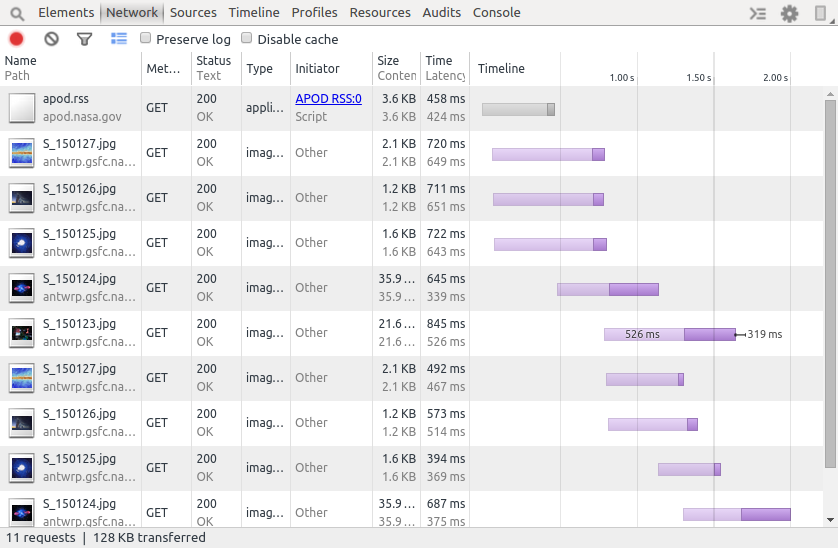
Add this line to your Gradle configuration:
dependencies {
    implementation 'com.facebook.stetho:stetho-okhttp3:1.3.0'
}
When instantiating OkHttp, make sure to pass in the StethoInterceptor.
OkHttpClient client = new OkHttpClient.Builder()
    .addNetworkInterceptor(new StethoInterceptor())
    .build();
Finally, make sure to initialize Stetho in your Application:
public class MyApplication extends Application {
  public void onCreate() {
    super.onCreate();
    Stetho.initializeWithDefaults(this);
  }
}
Using with Websockets
OkHttp v3.5 now includes support for bidirectional web sockets. The URL that should be used should be prefixed with ws:// or wss:// for the secure version. Although the connection ports are the same as HTTP (port 80 and port 443), the server still needs to be configured to support WebSockets since they are a completely different protocol.
// URL should be ws:// or wss:// (secure)
Request request = new Request.Builder().url(url).build();
WebSocket webSocket = client.newWebSocket(request, new WebSocketListener() {

  @Override
  public void onOpen(WebSocket webSocket, Response response) {
     // connection succeeded
  }

  @Override
  public void onMessage(WebSocket webSocket, String text) {
     // text message received
  }

  @Override
  public void onMessage(WebSocket webSocket, ByteString bytes) {
     // binary message received
  }

  @Override
  public void onClosed(WebSocket webSocket, int code, String reason) {
     // no more messages and the connection should be released
  }

  @Override
  public void onFailure(WebSocket webSocket, Throwable t, Response response) {
     // unexpected error
  }
});
To send a message, simply use the send() function:
websocket.send("hello");
Note that OkHttp handles all the work on a separate thread, so you don’t have to worry about making Websocket calls on the main thread.
If you need to close the connection properly, make sure to use a status code of 1000. See this link for the different status codes.
webSocket.close(1000, "closing");
Recipe guide
Check out Square’s official recipe guide for other examples of using OkHttp.
References
- Android’s HTTP Clients - Android Developers blog, September 29, 2011
- https://www.reddit.com/r/androiddev/comments/29p3zz/til_okhttp_engine_is_backing_httpurlconnection_as/
- https://github.com/square/okhttp/blob/master/okhttp-urlconnection/src/main/java/com/squareup/okhttp/internal/huc/HttpURLConnectionImpl.java
- https://speakerdeck.com/jakewharton/a-few-ok-libraries-droidcon-mtl-2015
- https://github.com/square/okio#sources-and-sink
- http://stackoverflow.com/questions/24246783/okhttp-response-callbacks-on-the-main-thread
- https://github.com/square/okhttp/wiki/Recipes
- https://twitter.com/jakewharton/status/482563299511250944
- History of OkHttp podcast